Go Up 2D Vertical Platformer Game
Fast-Paced 2D Arcade Platformer Built from Scratch in Python and Pygame with Custom Physics, Procedural Traps, and Score Altitude Scaling
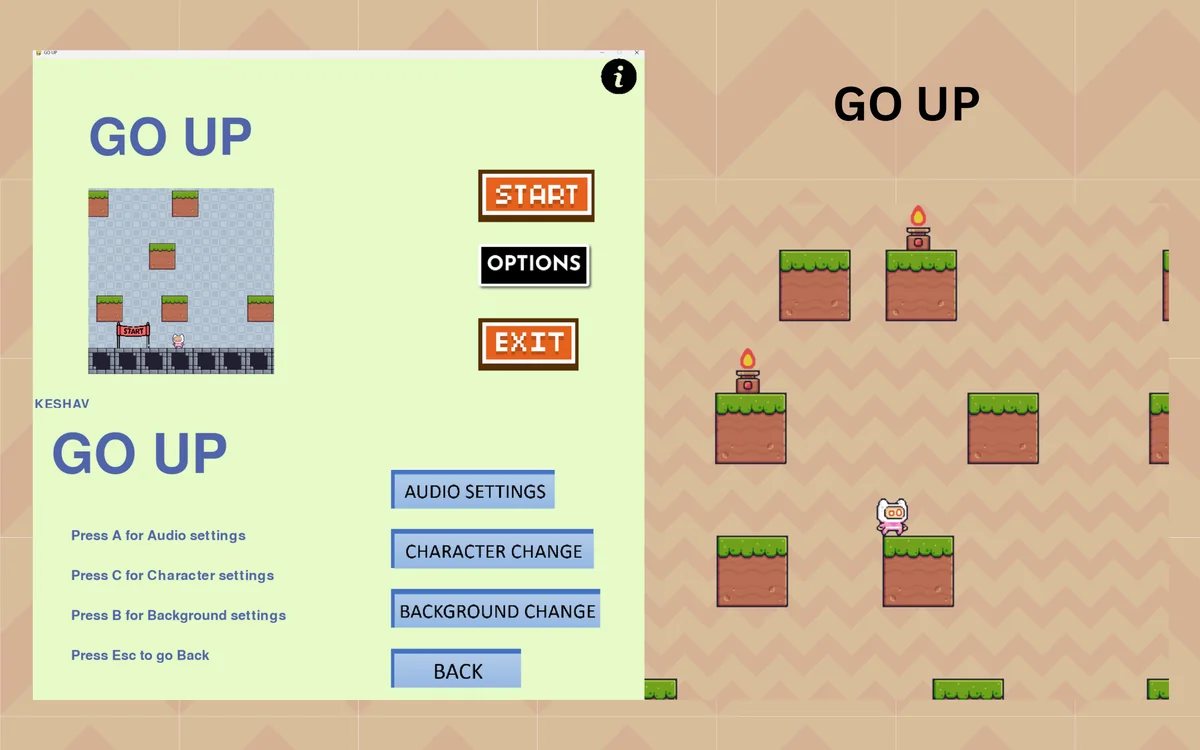
System Context & Value Proposition
Go Up is a fast-paced 2D vertical platformer engineered from scratch in Python using the Pygame library. The player controls a character ascending through dynamic platforms while evading deadly spikes, falling rocks, and crumbling ledges. The game features deterministic jump kinematics, procedural obstacle placement, altitude-based score scaling, and local high-score persistence.
Developing a responsive 2D platformer requires handling frame-rate independent physics, accurate collision detection, and dynamic procedural level generation without performance jitter.
System Architecture & Execution Flow
Pygame Initialization
      ↓
Game Loop (Fixed 60 FPS Timestep)
      ├── Event Handling (Keyboard Input: Left, Right, Jump)
      ├── Physics Engine (Gravity, Velocity, Friction, AABB Collision)
      ├── Procedural Level Generator (Platform Spawning & Trap Generation)
      ├── Camera Tracking (Smooth Vertical Follow)
      └── Surface Rendering & Double Buffering
      ↓
Score Ledger & High-Score Persistence
Multi-Tier Architectural Layers
Pygame Event Loop
Captures keyboard input with responsive horizontal acceleration, deceleration friction, and variable-height jump triggers.
Custom Python Kinematics
Axis-Aligned Bounding Box (AABB) intersection resolving player bounding boxes against solid, moving, and crumbling platform surfaces.
Algorithmic Spawner
Spawns platforms with increasing vertical gaps and trap frequencies proportional to player altitude.
Pygame Surface Blitting
Double-buffered rendering pipeline with animated sprite frames, particle trails, and parallax background layers.
Core Engineering Modules & Workflows
Realistic gravitational acceleration with terminal velocity damping and responsive horizontal momentum.
Standard solid platforms, moving horizontal platforms, springboards granting super-jumps, and crumbling temporary blocks.
Generates falling stalactites, static spike floors, and rising hazard boundaries as the player climbs.
Linear-interpolated camera system tracking player ascent while locking bottom bounds to prevent backtracking.
Calculates score proportional to vertical altitude reached and saves high scores locally.
Persistence Schemas & Execution Contracts
Database Schema & Entity Structure
Game State Machine:
  ├── States: [MENU, PLAYING, PAUSED, GAME_OVER]
  ├── PlayerEntity: { x, y, vx, vy, is_grounded, jump_strength }
  ├── PlatformEntity: { x, y, width, height, type: "normal" | "moving" | "crumble" }
  └── HighScoreStorage: local JSON score registry
Key Endpoints & Query Interfaces
Engineering Challenges & Specifications
Technical Obstacles Solved
Resolution: Implemented sub-step continuous collision resolution calculating trajectory sweep vectors prior to advancing player position.
Resolution: Built an object cleanup manager that prunes platform entities falling 200 pixels below the active camera viewport.
Technology Stack Matrix
| Category | Tooling & Frameworks |
|---|---|
| Language | Python 3.x |
| Engine / Library | Pygame (Python Game Development) |
| Collision Algorithm | Axis-Aligned Bounding Box (AABB) |
| Target Platform | PC (Windows / Linux / macOS) |